
Zod Codecs and nestjs
Announcing nestjs-zod v5.1
I'm excited to announce that nestjs-zod version 5.1 is now available! You can install it today:
npm install nestjs-zod@latest
This release includes several new features and bug fixes, but the headline feature is codec support. In this post, I'll explain what codecs are and how they can simplify your NestJS APIs.
What are Codecs?
A zod codec is a schema that can define transformations in both directions—encoding and decoding. This is different from a regular Zod schema, which only transforms data in one direction.
Here is the example from the zod documentation:
const stringToDate = z.codec(
  z.iso.datetime(),  // input schema: ISO date string
  z.date(),          // output schema: Date object
  {
    decode: (isoString) => new Date(isoString), // ISO string → Date
    encode: (date) => date.toISOString(),       // Date → ISO string
  }
);
To take advantage of the bi-directional transformations, zod introduced two new functions: decode and encode. Both decode and the existing parse function run the normal forward transformation. encode, however, runs the backwards transformation.
stringToDate.decode("2024-01-15T10:30:00.000Z")
// => Date

stringToDate.encode(new Date("2024-01-15T10:30:00.000Z"))
// => string
How do I use them in nestjs?
Think about how you typically want to work with dates in apis:
- Input: You receive a date as a JSON string like
"2026-01-05T12:00:00Z" - Internal: You want to work with a JavaScript
Dateobject in your code - Output: You need to serialize it back to a string for the API response
In the past, you would typically need to define two schemas for this with two separate forward transformations. One for the request body and one for the response body:
class CreateEventDto extends createZodDto(z.object({
  name: z.string(),
  date: z.iso.datetime().transform((date) => new Date(date))
})) {}

class EventDto extends createZodDto(z.object({
  name: z.string(),
  date: z.date().transform((date) => date.toISOString())
})) {}

@Controller('api/events')
class EventController {
  @Post()
  @ZodResponse({ type: EventDto })
  createEvent(@Body() event: CreateEventDto) {
    return event;
  }
}
However, with codecs, you only need one schema:
class EventDto extends createZodDto(z.object({
  name: z.string(),
  date: stringToDate,
}), {
  codec: true
}) {}

@Controller('api/events')
class EventController {
  @Post()
  @ZodResponse({ type: EventDto })
  createEvent(@Body() event: EventDto) {
    return event;
  }
}
The magic here is that:
- When a request comes in, the string dates are automatically parsed into
Dateobjects - Inside your controller, you work with proper
Dateinstances - When the response is sent, the dates are serialized back to ISO strings
- The OpenAPI documentation correctly shows the field as a
stringwithdate-timeformat
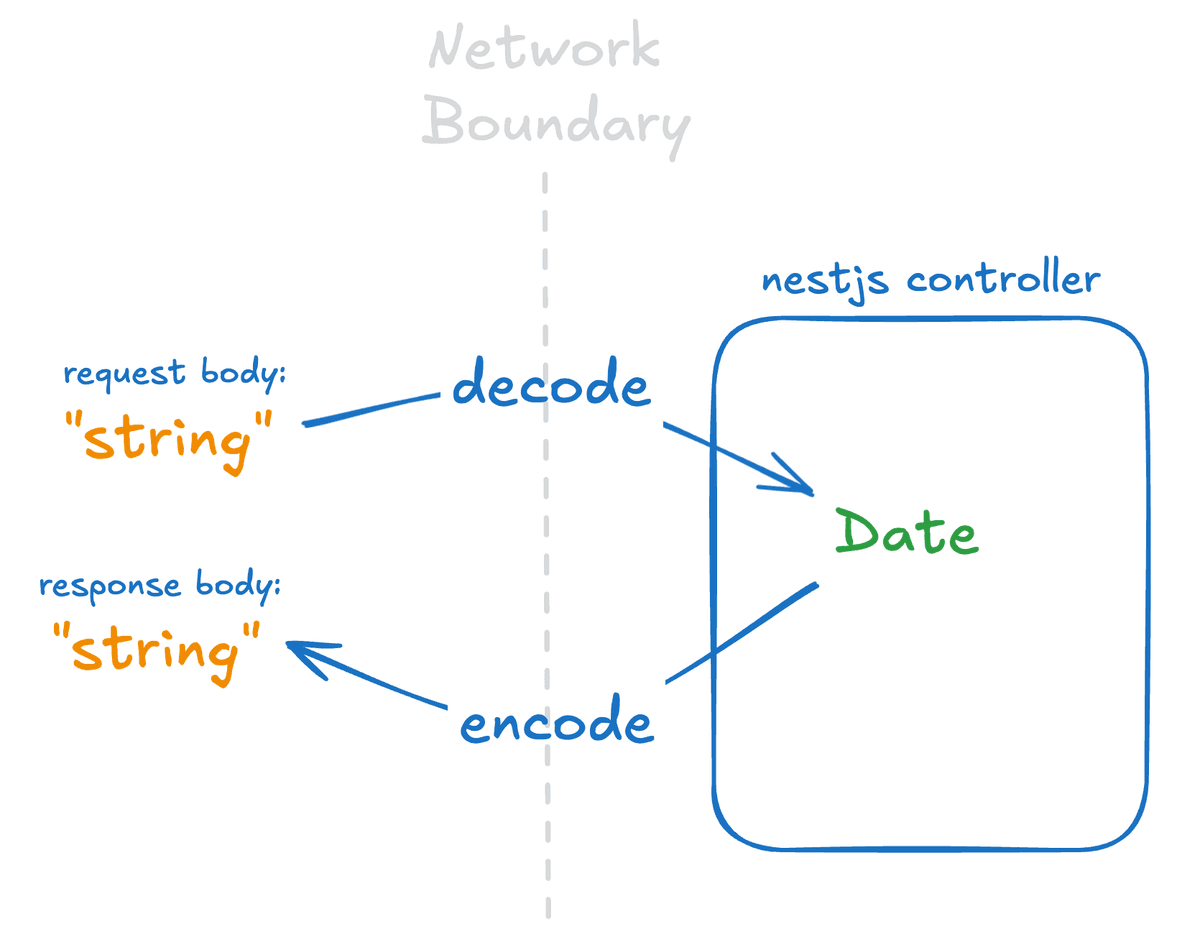
This approach using codecs reduces the amount of schemas you need and simplifies your data modelling.
Note that codec: true is needed here. This tells ZodResponse we want to use encode instead of parse when we serialize.
Also note you may still need different schemas for request bodies and response bodies, but it won't be because of the need for different transformations. It would likely be because some fields are required in the response but not the request (e.g. id).
Other New Features in v5.1
Beyond codecs, this release includes several other improvements:
strictSchemaDeclarationoption: A new option forcreateZodValidationPipethat enforces stricter schema declarations. This attribute enforces that every field that it encounters has a nestjs-zod schema. This can help ensure full type-safety and it's recommended to enable this, especially on new projects.createZodSerializerInterceptor: A new function for more control over response serialization. For example, this allows passing thereportInputzod parameter toparse/encode.titlemetadata support: You can now add title metadata to your schemas for better OpenAPI documentation. It allows visually renaming schemas in SwaggerUI.
Bug Fixes
This release also fixes several long-standing issues:
- Fixed ESM entry point to resolve globalRegistry mismatch
- Fixed optional nested query params
- Object query params now use deepObject style by default
- Fixed errors with nested named schemas
- Use
enuminstead ofconstfor OpenAPI 3.0 compatibility - Fixed serialization being skipped when returning primitives
Upgrading
To upgrade to v5.1, simply run:
npm install nestjs-zod@latest
Support the Project
If you or your organization uses nestjs-zod, please consider sponsoring me on GitHub. Your support helps ensure this project continues to be professionally maintained. As a thank you, sponsors get a free subscription to my other project, apisandbox.dev!
Check out the full release notes for more details.